Getting started
- Your AlertDesk mailbox — a Gmail of its own, an app password, a test letter.
- Free services to start with — ARK's trade notifications and Zacks.
- Letters you already get elsewhere — forward them by sender: Gmail · Outlook.com · Apple iCloud Mail · Yahoo Mail.
- Your broker's files: Schwab · Fidelity.
- Every week: import. Download the three files since your last import — transactions, positions and realized gain/loss; Import says, for each account, the day the next transactions download starts. Pick them all on Import broker files (the button on Positions, Trades and the Ledger), look inside, and press Import all. Files already imported are skipped.
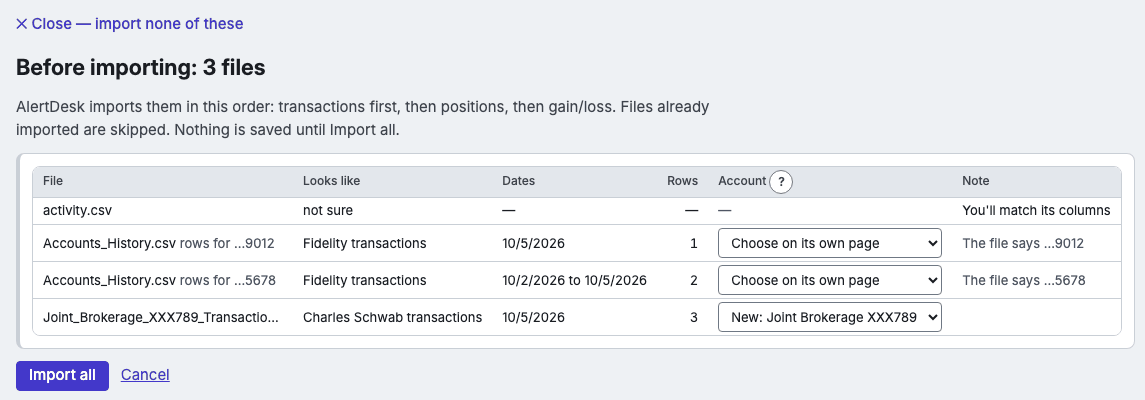
A picture of Import with three files picked, made-up data. - Accounts.
- Backups and restore — done by itself each night; restoring takes a few clicks.
- Prices — where prices come from, and why to leave AlertDesk open in the evening.
Replacing or deleting the app keeps your data -- in ~/Library/Application Support/AlertDesk on a Mac, in %LOCALAPPDATA%\AlertDesk on Windows, where the uninstaller asks whether to delete it too. To begin clean, use Settings → Start over before you uninstall.
ARK Invest and Zacks are examples of letters AlertDesk can read, not services we suggest or endorse. AlertDesk recommends no service.